
Every word on the beat.
Lyric Video Maker
Tap along to time your lyrics and download SRT or LRC, then set them over a slow AI backdrop made for text. Need the song or the words first? Both are made here too.
Backdrops made in the video studio:

Timing lyrics costs nothing. A song is 3 credits and backdrop clips are priced on the Generate button. Plans renew monthly until cancelled and can be cancelled online at any time — see pricing details.
Time your lyrics
Play the song, tap Space as each line starts, and export. Your audio file never leaves your device.
Your file stays on your device — it is played in the browser, never uploaded.
[Verse] and [Chorus] tags are ignored. No lyrics yet? Write them with the lyrics generator — songs from the music studio show theirs under the player.
A lyric video, start to finish
Words
Draft verses and a chorus from one idea, or bring your own.
Lyrics generator →Song
Generate the track with vocals — the lyrics it sang appear under the player.
Music studio →Backdrop
A slow 16:9 loop with room in the middle for the words. Join clips to cover the song.
Video studio →Timing
Tap the lines in above, download the SRT, and add it over the backdrop in your editor.
Lyric timer ↑
What happens outside WowMade: the lyrics are not burned into the video here. Import the backdrop, the song and the SRT into any editor with a captions track and style the text there — or upload the video to YouTube and add the SRT as its captions.
Backdrops that leave room for words
Slow, even clips from the video studio, each with its prompt. Add 'negative space in the centre, no text' to your own.
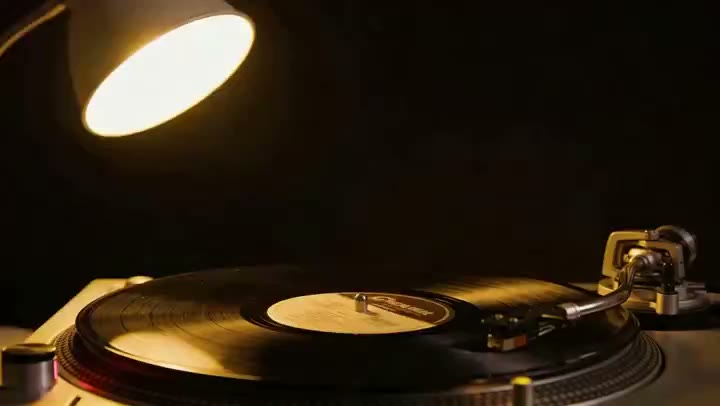
a black vinyl record turning under a single warm studio lamp, a ribbon of light rippling across its grooves
Use this promptaurora over a mountain lake
Use this promptink blooming in water
Use this prompthundreds of paper lanterns rising over a midnight lake, reflections shimmering on still water
Use this prompta crystal city at dusk, light trails weaving between translucent towers
Use this promptmacro slow motion of iridescent paint swirling into liquid gold
Use this promptReadable lyrics, every line
One line per caption. Break long lines where the singer breathes. Six to eight words on screen is plenty; more and the eye falls behind the voice.
Tap on the syllable, not the breath. A caption that lands a hair early reads as in time; one that lands late reads as lag. If a tap misses, Undo and tap the line again when you replay.
Quiet backdrop, loud text. Dark, slow and even behind white lettering, or a soft blur of the album cover for a single look. For a full video with a performer, see the AI music video generator.
Rights and labelling
Time and publish lyrics to songs you have the rights to — your own or ones you generated. Songs and clips made here carry a signed C2PA provenance mark identifying them as AI-generated, in line with Article 50 of the EU AI Act; anyone can read it on the verification page, and the Content & Safety Policy sets out what may not be created. Plans renew monthly until cancelled and can be cancelled online at any time; the full terms are on pricing details.
Frequently asked questions
Does WowMade put the lyrics on the video for me?
Not yet. WowMade makes the lyrics, the song and the backdrop, and times the lines for you on this page; the last step — laying the timed lyrics over the backdrop — happens in your video editor or as a caption track on YouTube, using the SRT file the timer exports.
How does the lyric timer work?
Choose the song — a file on your device or a library track — paste the lyrics one line per caption, press Play and start timing, and tap Space as each line begins. Undo fixes a late tap. Then download an SRT for captions or an LRC for synced lyrics. Nothing is uploaded and it costs nothing.
What is the difference between SRT and LRC?
SRT is a subtitle file: numbered lines with start and end times, read by YouTube's caption upload and by video editors' caption tracks. LRC is a synced-lyrics file: one timestamp per line, read by music players and lyric displays. The timer writes both from the same taps.
How do I make a backdrop that works under lyrics?
Ask the video studio for slow motion and empty space: 'slow drifting fog over dark water, lots of negative space in the centre, no text'. Keep the camera slow and the brightness even so white lyrics stay readable, and loop or join clips in the video merger to cover the song.
Can WowMade write the song and the lyrics too?
Yes. The AI lyrics generator drafts verses and a chorus from one idea, and the music studio writes and sings a full track — MiniMax Music 2.6, 3 credits — with the lyrics it sang shown under the player, ready to paste into the timer.
Are the backdrops and songs labelled as AI-generated?
Yes. Songs and video clips made here carry a signed C2PA provenance mark identifying them as AI-generated, which anyone can read on the verification page. The SRT and LRC files are plain text you wrote and timed; they carry no mark.
Everything a lyric video needs
One credit balance across music, video and image.
AI Lyrics Generator
Verses and a chorus from one idea.
OpenAI Music Studio
The song, sung, with its lyrics shown.
OpenAI Video Studio
Slow backdrop loops for the words.
OpenVideo Merger
Join backdrop clips to cover the song.
OpenAlbum Cover Maker
The still that sets the look.
OpenAI Music Video Generator
Performance clips and visuals.
OpenVerify AI content
Read the C2PA provenance mark on any file.
Open