Show the model who is in the shot. Then describe the shot.
Reference to Video
Give WAN 3.0 Prime up to twelve references — images of a character or product, clips for motion, sounds for the track — and generate video that holds to them, 5 to 30 seconds with native audio.
One subject, from a reference sheet to a clip:
A 5-second clip on WAN 3.0 Prime starts at 5 credits; reference video and audio add input seconds, and the total for your settings is shown on the Generate button before you commit. Plans renew monthly until cancelled and can be cancelled online at any time — see pricing details.
The consistency problem, and the input that solves it
Generative video engines sample. Ask for “a brass clockwork explorer in a long coat” five times and you get five explorers — the same idea, never the same figure. That is fine for a single clip and fatal for anything longer: a sequence, a series, a campaign in which the subject has to be recognisably itself from one shot to the next.
References replace the description with the thing. Hand the model pictures of the subject and it composes new shots of that subject — a different angle, a different action, a different location — instead of a fresh interpretation of the words. WAN 3.0 Prime is built around this input: it does not generate from text alone, and it takes up to twelve references at once, which is more than any other engine in the studio.
A reference sheet, generated
One subject in four canonical views under the same light — the set the AI character generator produces, each captioned with its prompt. Four views like these are what a reference set should contain.
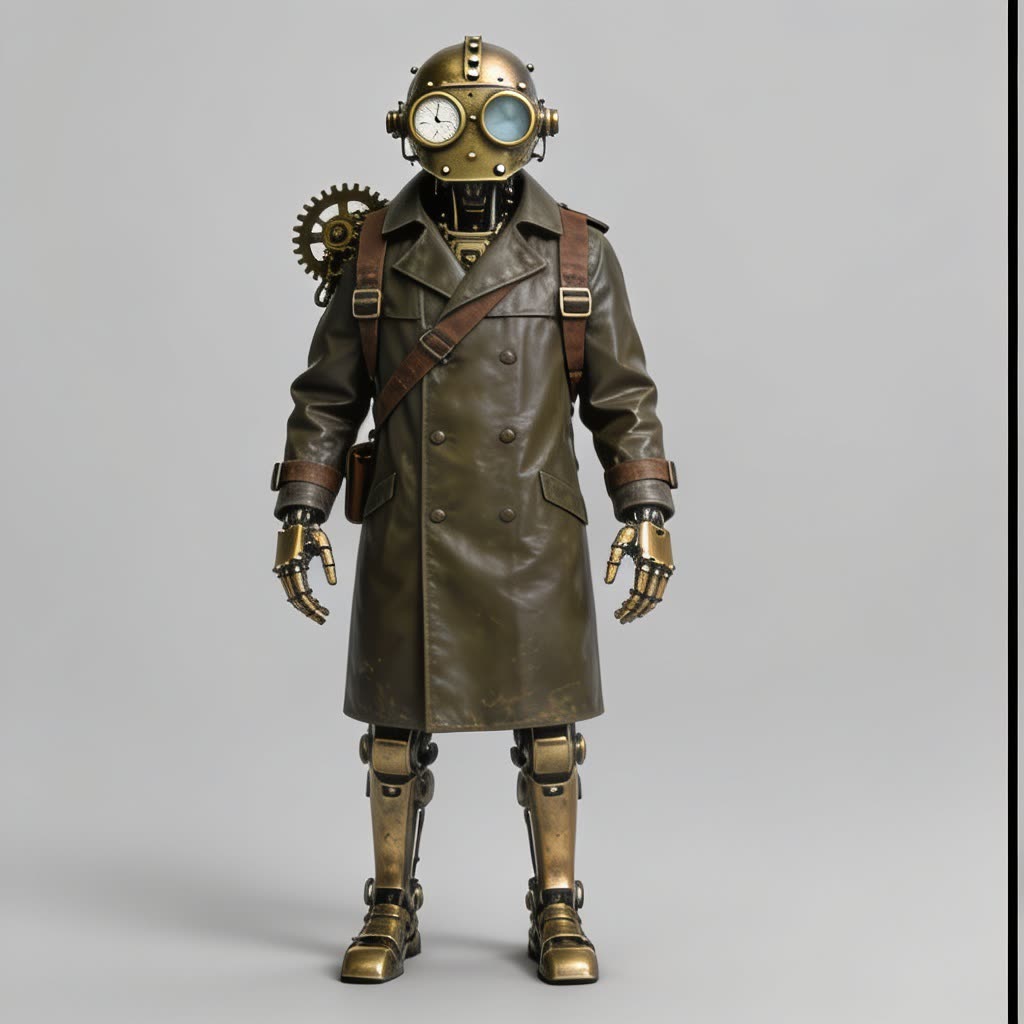 AI generated
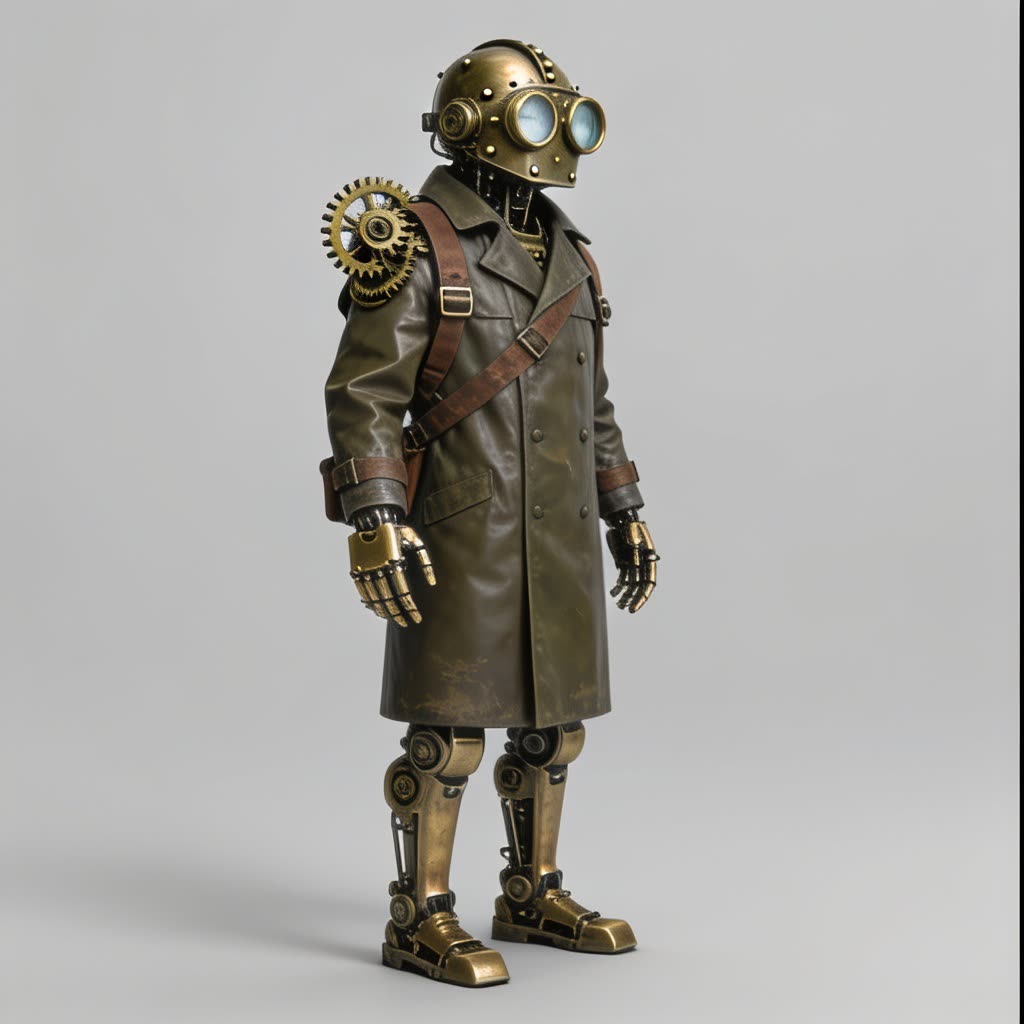 AI generated
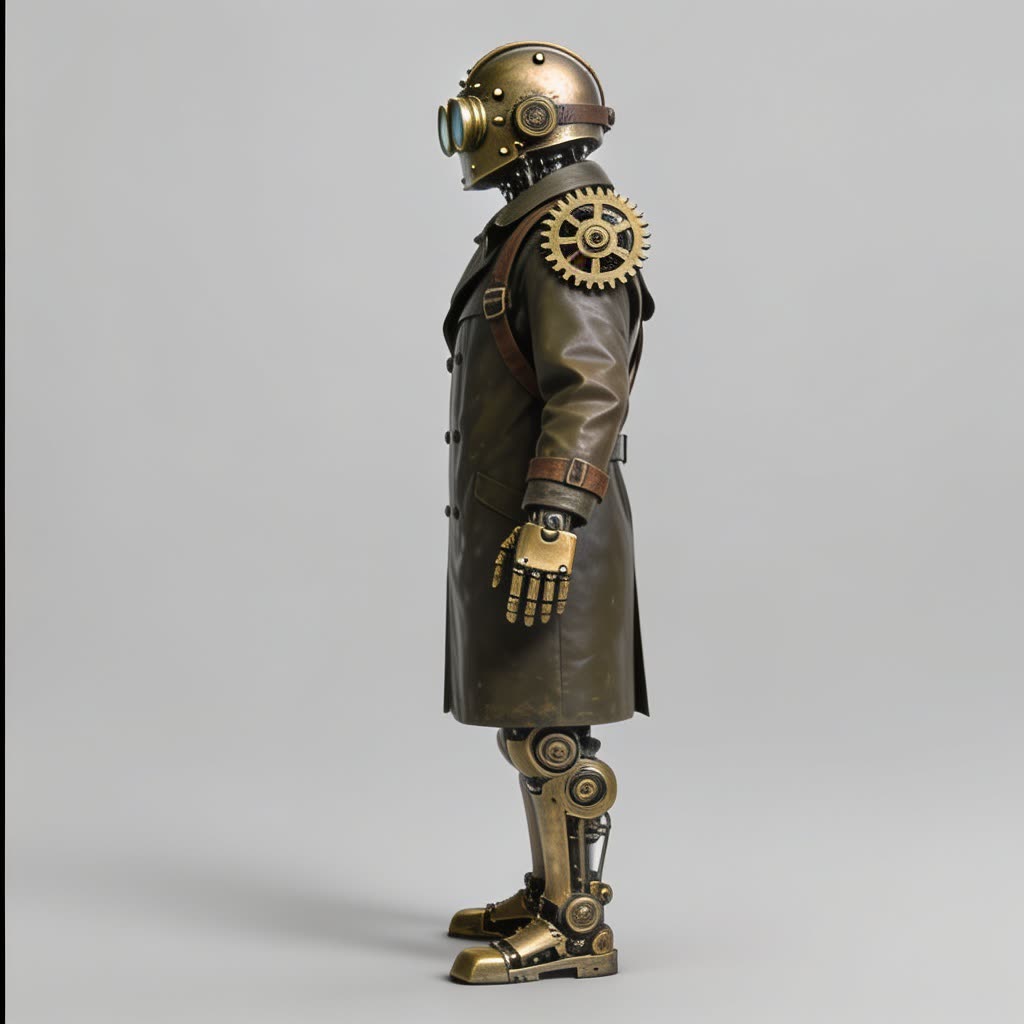 AI generated
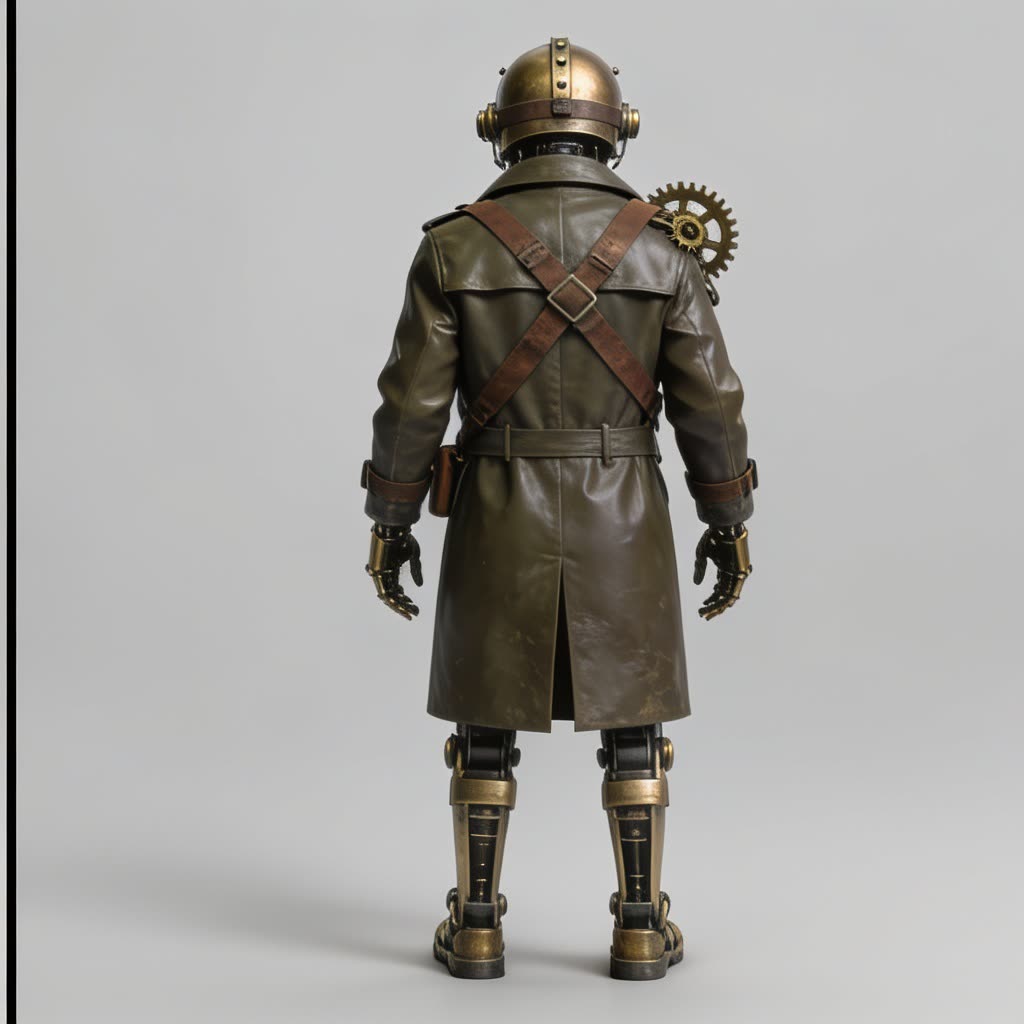 AI generated
Building a reference set that works
Make the subject once
Generate it in the AI image generator, or use photographs you hold the rights to. Front, three-quarter, profile and back, same backdrop, same light, same fittings.
Attach the sheet
Drop the views into the reference slots on WAN 3.0 Prime, or save the subject as a character and type its @ mention into the prompt. Add a style image if the grade matters.
Describe the new shot
The prompt now says what happens, where and how the camera moves — not what the subject looks like. The references carry that.
Keep the winner as a reference
Once a clip nails the subject, use it as a video reference for the next one. Motion and grade carry over as well as looks.
What each reference type carries
Images fix the look: the subject, its materials and colours, a wardrobe, a product’s exact packaging. They are the cheap input and the one most work needs. A video reference adds what a still cannot — a way of moving, a camera habit, a colour grade — and an audio reference gives the native track something to follow, from a tempo to a room tone.
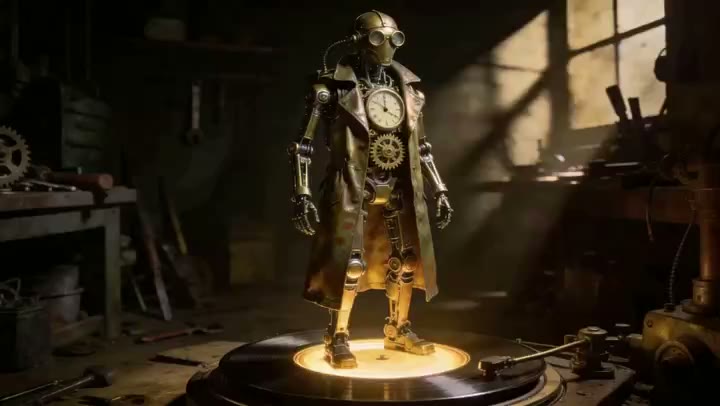
The turntable clip here was generated from the prompt shown on it, on the same subject as the sheet above; the sheet and the clip together are what a reference-driven series looks like — one figure, four views, then motion.
Inputs, caps and cost
| Input | Cap | What it carries | Cost |
|---|---|---|---|
| Reference images | Up to 6 | Subject, product, wardrobe, colour palette | Cheapest: images bill as one input second |
| Reference videos | Up to 3, 15 s each | Motion, camera habit, colour grade | Billed as input seconds on top of the clip |
| Reference audio | Up to 3, 15 s each | Tempo, ambience, voice quality for the native track | Billed as input seconds on top of the clip |
| Start frame | 1, optional | The literal first frame, unchanged | Can be combined with references |
Per-second credit rates for WAN 3.0 Prime and every other engine are on AI video models compared; the studio prices your exact combination before you run it.
WAN 3.0 Prime generates 5, 10 or 30 seconds at 480p, 720p or 1080p with native audio, in six aspect ratios. For a 4K finish, take the approved clip to Seedance 2.5 as a start frame, or raise it with the video upscaler. A single product still that needs a camera move rather than a series belongs on the product video route; a shot that starts from one fixed frame belongs on image to video.
Likeness, rights and labelling
References are film-craft applied to a subject you are entitled to film. A real person’s likeness needs that person’s consent; brand assets must be yours to use; uploads are screened before generation and are your responsibility under the terms of service. Every clip generated here carries a signed C2PA provenance mark identifying it as AI-generated, in line with Article 50 of the EU AI Act; the mark travels with the file and anyone can read it back on the verification page. The Content & Safety Policy sets out what may not be created here. Plans renew monthly until cancelled and can be cancelled online at any time; the full terms are on pricing details.
Frequently asked questions
What is reference to video?
A way of generating video where the model is given examples to hold to — images of a character, a product or a style, short clips for motion, sounds for the audio — alongside the prompt. Instead of inventing a subject from words, it renders the one in the references. On WowMade this is what WAN 3.0 Prime is built for: up to twelve references go in, and the clip is generated to match them.
How is a reference different from a start frame?
A start frame is the literal first frame of the clip: the picture is unchanged and motion follows from it. A reference is a description by example: the model studies it and then composes a new shot that keeps the subject, style or sound, from any angle and in any framing. Use a start frame when the composition is settled; use references when the subject must reappear in shots you have not composed yet.
How many references can I give WAN 3.0 Prime?
Up to twelve in total: six reference images, three reference videos and three reference audio clips. Video and audio references can be up to 15 seconds each and are billed as input seconds on top of the clip you generate, which is why a set of images is the cheapest way to lock a subject. The cost of your exact combination is printed on the Generate button before you run it.
Does a reference set guarantee the character is identical in every clip?
It gets close and it is the most reliable method available, but generative models sample, so treat consistency as something you build rather than switch on. A reference sheet with front, three-quarter, profile and back views under the same light does most of the work; describing the subject the same way in every prompt does the rest. Generate a few, keep the best, and reuse that clip as a video reference for the next.
Can I use references of a real person or a brand?
Only with the rights to do so. A real person's likeness needs that person's consent, and brand assets must be yours to use — uploads are screened before generation and are your responsibility under the terms of service. The Content and Safety Policy sets out what may not be created here, and every clip carries a C2PA mark identifying it as AI-generated.
What do video and audio references do?
A video reference carries motion and style — a walking rhythm, a camera habit, a colour grade — that stills cannot. An audio reference gives the native audio track something to follow: a tempo, an ambience, a voice quality. Both are capped at 15 seconds, and both are optional; most character work is done with images alone.
How do saved characters and @ mentions fit in?
Build the subject once in the AI character generator, save it, and pull it into any prompt with an @ mention — the studio attaches its reference sheet for you. The same works for saved locations and objects, so a recurring set of references becomes a name you type rather than files you upload each time.
Where to go next
One credit balance across video, image, music and the editing tools.
AI Video Studio
Pick WAN 3.0 Prime, add references and a prompt.
OpenAI Character Generator
Build the four-view reference sheet and save it.
OpenImage to Video
When one fixed first frame is the better control.
OpenAI Product Video
A product still, moved on camera.
OpenVideo Upscaler
Take an approved 1080p clip further.
OpenAI Music Generator
Score the series with a track made the same way.
OpenVerify AI content
Read the C2PA provenance mark on any file.
OpenLatest image to video guides
See every image to video guide →
How to make AI videos for YouTube: a practical, monetisable workflow
Step-by-step guide for creators to produce monetisable YouTube long-form and Shorts with AI, disclosure requirements, formats, and a fast build in WowMade AI Video Generator.

AI video Instagram Reels: Fast, vertical-first workflows that actually publish
Step-by-step workflows to turn a product photo or text idea into a 15–30s vertical Instagram Reel using WowMade AI Video Generator, with audio, specs, and disclosure guidance.

ai video prompt copy paste: a ready-to-use prompt library for image-to-video
Copy-and-paste AI video prompts and a workflow to turn a still into short social clips. Templates, checks, and a step-by-step WowMade AI Video Generator workflow.